
Challenges that CIOs, CTOs, IT Directors Face
Polices and procedures are the nemesis of IT executives around the world
When a CIO or an IT Executive takes over a new job one of the greatest challenges is to quickly validate that the infrastructure that is in place. Would it not be nice to have some tools that could be use to quickly put proven world class policies in place with minimal effort. That is what the CIO IT Infrastructure Policy Bundle does.
Gain control over your IT realm! Download a collection of over Janco's IT infrastructure and policy templates. Each can be modified to align with your needs. This comprehensive collection comes with a variety of highly-researched tools that will help you develop a complete guide that fits the unique needs of your organization and provides tools and suggestions for policy communication and enforcement.
Defining Your Optimal IT Infrastructure is a critical task that can no longer wait with all of the changes mandated by PCI-DSS, HIPAA, ISO, ITIL, Sarbanes-Oxley, changing economic environment, and changes to enterprise operating environments.
Order IT Infrastructure Policies Download Selected Pages
CIO IT Infrastructure Policy Bundle
 Janco has assembled the policies that it has developed over time with some of the best IT organizations around the globe into a single package. With this bundle you get a PDF file that has all of the procedures in a single document that is over 280 pages long. In addition you get a separate MS-Word document for each procedure which can easily be modified.
It would take your staff months to develop these procedures from scratch. This bundle contains the following policies:
The policies have just been updated to comply with all mandated requirements and include electronic forms that can be Emailed, filled out completely on the computer, routed and stored electronically -- a total solution.
We have just completed a major update of all the individual polices and all of the electronic forms.
- CIO IT Infrastructure Policy Bundle (All of the policies below are included as individual MS Word files and a single PDF file. Electronic forms are all individual documents that are easily modifiable)
- Backup and Backup Retention Policy
- Blog and Personal Web Site Policy (Includes electronic Blog Compliance Agreement Form)
- BYOD Policy Template (Includes electronic BYOD Access and Use Agreement Form)
- Google Glass Policy (Includes Google Glass Access and Use Agreement Form)
- Incident Communication Plan Policy (Updated to include pandemic considerations and social networks as a communication path)
- Internet, e-mail, Social Networking, Mobile Device, Electronic Communications, and Record Retention Policy(Includes 5 electronic forms to aid in the quick deployment of this policy)
- Mobile Device Access and Use Policy
- Patch Management Policy
- Outsourcing and Cloud Based File Sharing Policy
- Physical and Virtual Server Security Policy
- Privacy Compliance Policy - California Privacy Act
- Record Classification, Management, Retention, and Destruction Policy
- Safety Program (Includes mandated OSHA electronic forms)
- Sensitive Information Policy (CCPA, GDPR & HIPAA Compliant and includes electronic Sensitive Information Policy Compliance Agreement Form)
- Service Level Agreement (SLA) Policy Template with KPI Metrics
- Social Networking Policy (includes electronic form)
- Technology Acquisition Policy
- Text Messaging Sensitive and Confidential Information (includes electronic form)
- Travel, Electronic Meeting, and Off-Site Meeting Policy
- Wearable Device Policy
- WFH & Telecommuting Policy (includes 8 electronic forms to effectively manage work at home staff)
- IT Infrastructure Electronic Forms
Order IT Infrastructure Policies Download Selected Pages
The policies help enterprises:
- Understand and explain what infrastructure is, enabling enterprises, their constituents, and the executive team to manage the enterprise's technology environment more effectively;
- Analyze the current state their enterprise's infrastructure so they know where it works well and where to focus improvement efforts;
- Justify infrastructure spending, using the template's comprehensive definitions and ready to use examples to link IT infrastructure and the enterprise's bottom line; and,
- Prioritize enterprise resources with a prescriptive toolset that lets enterprises focus their efforts in a cost effective manner.
In addition to this bundle there also is a CIO Infrastructure Management Tool kit that combines many of the most popular tools with discounts up to 30% or more. The options are:

Individual Policies
Backup and Backup Retention Policy
 IT organizations of all sizes contend with a growing data footprint with more data to manage, protect and preserve for longer periods of time. Online primary storage, has focus a on fast low latency, reliable access to data while near-line secondary storage has a focus on low cost and high capacity. Long-term data retention requires a combination of ultra-low cost, good performance during storage and retrieval, and reduced footprint in terms of power, cooling, floor-space and economics (PCFE) - also known as a small green footprint - for inactive data.
Read on Order Backup Policy Backup Policy Download Selected Pages
Blog and Personal Web Site Policy
 With the advent of blogs, there is a need to set rules of the road for the use of blogs by employees, contractors, agents, supplies and others. This 8 page sample blog policy contains specific policy statements on what can and can not be done via blogs. There are 13 specific guidelines defined as specific guidelines for personal web sites and blogs which are on your enterprise's domains and those on are on domains outside of your enterprise's control.
The policy template comes in word format and can easily be modified to meet the specific requirements of any size enterprise.
Incident Communication Plan Policy
 Now Includes Social Networking as a Media Outlet
Compliant with ISO/IEC 27035:2011
NEW Electronic Forms - Incident Communication Contact Form
and Pandemic Planning Checklist
Order Incident Communication Policy Download Selected Pages
To survive an incident such as a business interruption, security breach, or a product recall, organizations need more than a successful communication strategy - they need an incident communication plan.
The overall objectives of a incident communications plan should be established at the outset. The objectives should be agreed upon, well understood, and publicized. For example, will the primary objective of the communications plan be for communications only to employees, and only during a disaster? Or is the intent to advise customers of interruptions to service? Or is it for investors and stockholders? Or regulatory agencies? Or is it some combination of these?
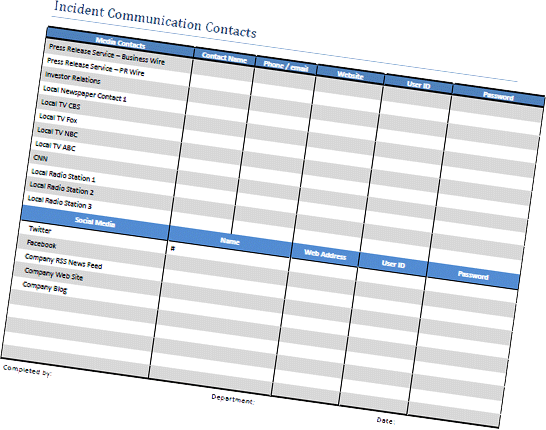
Whatever the objectives of the enterprise, they should be shared, supported by executive management, and widely communicated - both via traditional media contact and social networks. This policy template addresses those needs directly as well as provides electronic tools that aid in the execution of of the policy.
The specific objective of this incident communication plan is to define who will provide key communications during a crisis including content, recipients, schedule, method of delivery, frequency, and priority of the communication. By outlining a communication plan in advance, the business is better able to
- Communicate the effects and status of a crisis for employees, associates, suppliers and customers,
- Reduce the impact of bad publicity, maintain customer service, bolster relations with vendors and
- Address the concerns of other key stakeholders
Internet, e-mail, Social Networking Mobile Device, Electronic Communications, and Record Retention Policy
 Driving electronic communication is the fact that data is easier to find when it is a click away than when it is stacked in folders. E-mail is a great source of easy-to-access information. When faxes and paper communication are integrated into the email automation framework, there is little fear of losing them.
Order email communication Policy Download Policy Selected Pages
Telecommuting
Organizations that have or want to establish a company wide telecommuting program should establish a formal, written telecommuting policy document that is regularly reviewed and updated by IT, human resources, legal, and finance. This will ensure that managers and the corporate services and technical support groups within the organization are aware of their respective role and responsibilities for enabling and supporting telecommuting. It also will help ensure that telecommuting employees know about their responsibilities too, along with new company and approved third-party applications and support services available outside company facilities.
Compliance Requirements
Businesses have to comply with industry-specific regulations for digital communications. This is a bigger challenge for multinational companies, where regulations vary from country to country. How can companies comply with these regulations without sacrificing business velocity and driving up costs? The answer lies in adopting standardized email policies that include best practice work flows to enforce compliance with industry-specific rules for process and content. This serves the dual purpose of keeping businesses out of trouble and providing superior customer experience.
Commercial Email
Best Practices for commercial Email are defined with compliance to CAN-SPAM Act as its focus.
Email Archiving
All companies archive e-mail whether they realize it or not. Merely backing up an e-mail server creates an archive. The real question is what policies your company should have regarding those archives. What messages should be archived, for how long, and who should be able to access them?
Depending on your requirements, which may or may not involve regulatory compliance, you can determine whether you need a separate e-mail archiving solution, and if so, what features it should have. In some cases, the features built into e-mail servers, which include e-mail retention policies and basic e-discovery capabilities, may be sufficient. In others, you may need to pay for a full-featured archiving system.
That may be money well spent if your risk is high. Financial penalties have been levied against companies not for any malfeasance, but simply for failing to comply with legal discovery or record-keeping requirements. Clearly, the costs of archiving would be more than offset in this situation.
Remember, however, that an e-mail archiving solution is not a substitute for a traditional e-mail backup and recovery solution. You still need the latter for e-mail reliability and availability. But the two can work hand in hand. E-mail archiving solutions feature additional benefits such as mailbox management, e-mail administration, and mail policy monitoring. Archiving can also help ease the burden on mail administrators, lowering overall costs by moving mail off of primary storage, pulling PST (Personal Storage Table) files off client systems, monitoring mail in real time for policy violations, and more.
Telecommuting threats
Today's email threats are far more dangerous than yesterday's. On the inbound side, blended email and web attacks masterminded by profit-seeking criminals are now the norm. Spam is no longer about selling, it's about stealing. Attacks are targeted and fast moving. The perpetrators are more sinister, organized, and sophisticated. Orchestrated botnet armies strike globally and quickly go dormant. Harmful payloads morph continuously to evade signature-based defenses, and are more often delivered through an embedded web link rather than a direct file attachment. Every malicious email that penetrates the perimeter carries dramatically more risk than ever before.
Order email communication Policy Download Policy Selected Pages
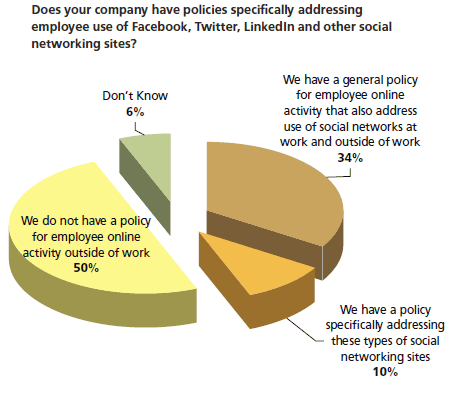
Over 50% of all companies do not have policies for the appropriate use of the Internet. The problem now is that when you Twitter or post to a blog information that might be sensitive thousands of people can see it immediately, and then thousands more could see it as it's forwarded on to others. The ramifications of making a mistake, of putting things that shouldn't be on there on those sites, are even greater than they used to be.
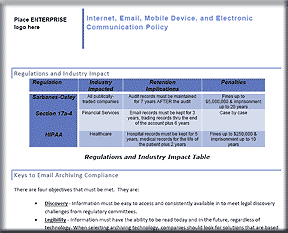
This policy is is compliant with all recent legislation (SOX, HIPAA, Patriot Act, and Sensitive information), and
covers: 
- Appropriate Use of Equipment
- Social Networks
- Mobile Devices
- Internet Access
- Electronic Mail
- Retention of E-mail on Personal Systems
- E-mail and Business Records Retention
- Copyrighted Materials
- Banned Activities
- Ownership of Information
- Security
- Sarbanes-Oxley
- Abuse
Included with the policy are forms that can be used to facilitate the implementation of the policy. Included are these ready to use forms:
- Internet & Electronic Communication Employee Acknowledgement
- E-mail - Employee Acknowledgement
- Internet Use Approval Form
- Internet Access Request Form
- Security Access Application Form
The WORD
template uses the latest CSS style sheet and can easily be modified
to conform to the style used in your enterprise policy manual.
Order email communication Policy Download Policy Selected Pages
Mobile Device Access and Use Policy
 The purpose of this policy is to define standards, procedures, and restrictions for end users who have specific and authorized business requirements to access enterprise data from a mobile device connected via a wireless or unmanaged network outside of ENTERPRISE's direct control. This policy applies to, but is not limited to, all devices and media that fit the following device classifications:
- Smartphones
- PDAs
- USB applications and data
- Laptop/notebook/tablet computers
- Ultra-mobile PCs (UMPC)
- Mobile/cellular phones
- Home or personal computers used to access enterprise resources
- Any mobile device capable of storing corporate data and connecting to an unmanaged network
The policy applies to any hardware and related software that could be used to access enterprise resources, even if the equipment is not approved, owned, or supplied by ENTERPRISE.
Mobile Device Access and Use Policy Template - This policy is 10 pages in length. It contains everything that an enterprise needs to implement a functioning and compliant mobile device and use process. Included are forms defining the mobile device environment.
Outsourcing and Cloud-Based File Sharing Policy
Outsourcing and Cloud-Based File Sharing Policy - This policy is 26 page in length and defines everything that is needed for function to be outsourced or the data to be shared via the cloud. The policy comes as a Microsoft Word document that can be modified as needed. The template has been updated to include a full audit program definition is 26 pages in length and covers:
- Outsourcing Management Standard
- Service Level Agreement
- Responsibility
- Outsourcing Policy
- Policy Statement
- Goal
- Cloud Based File Sharing
- Approval Standard
- Base Case
- Responsibilities
Included are two complete job descriptions in MS Word format -- Manager Outsourcing and Manager Vendor Management as well as two electronic forms -- Outsourcing Security Compliance Agreement and Outsourcing / Cloud Security Compliance Agreement.
Order Outsourcing Policy Download Table of Contents
Note: Look at the Practical Guide for Outsourcing, it is over 110 page in length and contains more extensive processes for outsourcing
Record Classification, Management, Retention, and Destruction policy
 There are many common myths about tape, disk, data protection and archiving, one, for example, being that archiving and long-term data retention are only for regulatory compliance purposes. The reality is that while regulatory compliance data, including Sarbanes-Oxley, ISO, financial or HIPAA medical, require long-term retention, many other common application data for almost every business, including those that do not fall under regulatory requirements, can benefit from - if not require - long–term data retention. The notion is to think beyond regulatory compliance. In other words, organizations of all sizes need and rely on information, both current and past.
Contains everything needed to implement a record management policy including an Interview Checklist to use when you are implementing a records management process
Order Record Management Policy Download Selected Pages Version History
A record is essentially any material that contains information about your company's plans, results, policies or performance. In other words, anything about your company that can be represented with words or numbers can be considered a business record - and you are now expected to retain and manage every one of those records, for slementing or altering the policy.
Several years or even permanently depending on the nature of the information. The need to manage potentially millions of records each year creates many new challenges for your business, and especially for your IT managers who must come up with rock-solid solutions to securely store and manage all this data.
The Record Classification, Management, Retention, and Destruction policy is a detail template which can be utilized on day one to create a records management process. Included with the policy are forms for establishing the record management retention and destruction schedule and a full job description with responsibilities for the Manager Records Administration.
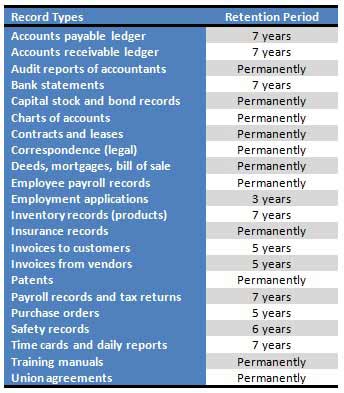
The areas included with this policy template are:
- Record retention requirements for SOX sections 103a, 302, 404, 409, 801a and 802.
- Policy
- Standard
- Scope
- Responsibilities
- Record Management
- Compliance and Enforcement
- E-mail Retention and Compliance
- Job Description Manager Record Administrator
- 12 forms for Record Retention and Disposition Schedule
- Record Management Best Practices
You can download the Table of Contents and selected pages for this policy template.
Order Record Management Policy Download Selected Pages Version History
Sensitive Information Policy
Includes HIPAA Audit Program Guide, a PCI Audit Program, and an electronic form that can be used to quickly deploy this Policy. Plus as a bonus you get the User/Customer Bill of Rights for Sensitive and Confidential Information.
 This
policy is easily modified and defines how to treat Credit Card,
Social Security, Employee, and Customer Data. The template is 34
pages in length and complies with GDPR, Sarbanes Oxley Section 404,
ISO 27000 (17799), and HIPAA. The PCI Audit Program that is
included is an additional 50 plus pages in length.
This
policy is easily modified and defines how to treat Credit Card,
Social Security, Employee, and Customer Data. The template is 34
pages in length and complies with GDPR, Sarbanes Oxley Section 404,
ISO 27000 (17799), and HIPAA. The PCI Audit Program that is
included is an additional 50 plus pages in length.
This policy applies to the entire enterprise, its vendors, its suppliers (including outsourcers) and co-location providers and facilities regardless of the methods used to store and retrieve sensitive information (e.g. online processing, outsourced to a third party, Internet, Intranet or swipe terminals).
The HIPAA Audit Program Guide provides you with a checklist of the must be implemented items which HIPAA mandates.
You can download the Table of Contents and some sample pages by clicking on the link below.
Order Sensitive Information Policy Download Selected Pages Version History
Service Level Agreement Policy Template with Sample KPI Metrics
Download Instructions Shipped immediately via E-mAIL
 Service Level Agreement Policy Template is
a nine page policy for a single application, It defines specific
SLAs and metrics that are both internally and externally focused. The
sample contain over 70 possible metrics presented graphically in PDF
format.
Service Level Agreement Policy Template is
a nine page policy for a single application, It defines specific
SLAs and metrics that are both internally and externally focused. The
sample contain over 70 possible metrics presented graphically in PDF
format.
The table of contents for the policy template is as follows.
Service Level Agreement For The Application
- Overview
- Three-Tier Environment
- Service Level Agreement (SLA)
- Internal IT SLAs
- Hardware/Network Maintenance
- Backup and Recover
- Application Administration
- Application Updates
- External SLA
- IT Obligations
- End User Obligations
- Internal IT SLAs
- Sample Metrics
The sample metrics are provided in PDF format. Click on the small image below to see one page of the PDF file with the book marked outline of the document showing the classification of the 70 metrics depicted graphically
Social Networking Policy
 Social networking is going corporate. The popular technology used by millions of people to share ideas and photos on MySpace, Facebook, LinkedIn and others is catching on at companies to improve productivity and communication among workers. Private, internal social networks make sense as companies grapple with a slumping economy that has made travel cost-prohibitive even as workforces are spread out as never before.
Order Social Networking Policy Download Selected Pages
With increased adoption of social networks among the public, organizations have begun setting up profiles within social networks as a means to further connect with their audiences. Organizations who have been most successful in these endeavors take time to survey the community, understand the values and rules of engagement. In short, they pay attention to the culture and identify what is accepted before they join. When they join, the organizations who have had success within social networks remember that this isn't a place for traditional public relations tactics but a place for engagement. These organizations don't always just talk about themselves, but they have real and human-toned conversations with real people.
The issue faced by enterprises of all sizes is ensuring that the right message is being communicated in a consistent manner. The first step in achieving this objective is to have a uniform social network policy.
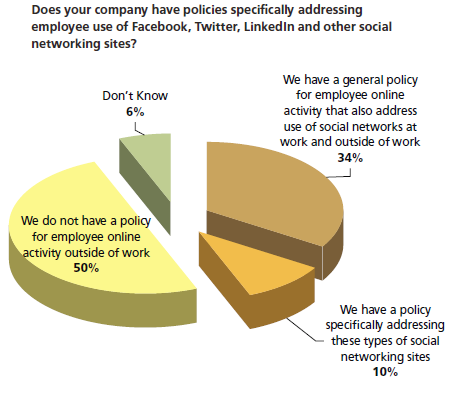
Janco recommends that companies embrace social networking because:
- Social networking is going to happen - Workers increasingly have Internet access on their smart phones. By the year 2013, 43% of global mobile internet users (607.5 million people worldwide) will be accessing social networks from their mobile devices.
- Most employeess will use it wisely and for the benefit of the enterprise - Some CIOs fear that social networking would lead to "Networking" instead of doing their jobs. Employees with proper training and guidance will use this new "technology" in ways that will enhance the enterprise's products ans services.
- Social networks actually can make workers more productive - Three out of four of the 895 experts interviewed for the recent Pew Internet report The Future of the Internet IV, said that use of the Internet enhances and augments human intelligence, and two-thirds said use of the Internet has improved reading, writing, and rendering of knowledge.
- Great ideas are gems that are ready to be found on social networks - Great ideas can come from any level of a company. Using social networks internally (wikis, blogs, forums, even IM) fosters collaboration, and allows workers at all levels to contribute ideas.
- Employees are trustworthy - Managers worry that employees will leak confidential information, or speak poorly of the company. but with the proper training and procedures in place this is a non-issue.
The Social Networking Policy Template is the right tool for this task. With it you can successfully manage and control your employees' activity that are related to your enterprise.
Read on Social Networking Policy Order Social Networking Policy Download TOC Social Networking Policy
Work From Home (WFH) & Telecommuting Policy
 WFH & Telecommuting is a popular alternative to making the drive in to work every day. If your users are asking about telecommuting to work, you may find that a telecommuting policy helps makes things clear to them.
With the rise of the Internet, and the increase in affordable bandwidth came a new type of worker, the WFHer and telecommuter. Available technologies, in certain cases, have allowed some companies to offer the ability for certain employees to work from home instead of the office. This can be not only a benefit for the employee, but also for the company itself. As more and more employees clamor for the ability toWFH & telecommute, it is imperative for companies to have an in place a viable telecommuting policy.
WFH & Telecommuting Policy Template - This policy is over 20 pages in length. It contains everything that an enterprise needs to implement a functioning and compliant WFH & telecommuting process. Included are forms defining the working environment in addition to a check list to validate that the off site location complies with you safety requirements.
Travel and Off-Site Meeting Policy
Travel and Off-Site Meeting Policy - Protection of data and software is often is complicated by the fact that it can be accessed from remote locations. As individuals travel and attend off-site meetings with other employees, contractors, suppliers and customers data and software can be compromised. This policy is sixteen pages in length (plus 4 electronic forms and 4 detail job descriptions) and covers:
- Laptop and PDA Security
- Wireless and Virtual Private Networks (VPN)
- Data and Application Security
- Public Shared Resources
- Minimizing attention
- Off-Site Meetings
- Remote Computing Best Practices
The job descriptions included are:
This policy has been updated to reflect the requirements of PCI-DSS, Sarbanes-Oxley, HIPAA, and ISO. The policy comes as both a WORD file and a PDF file utilizing a standard CSS style sheet.
Order Travel and Off-Site Meeting Policy Download Selected Pages
