
Password Rules, Tips, and Best Practices
 Changing passwords is often met with resistance because in many instances it might make them more difficult to remember; however, complex passwords offer optimal protection for your account. Choosing an ill-advised, simple password could possibly result in having your machine compromised and your identity stolen.
Complex passwords are very difficult to guess or even crack using commonly available code breaking software. Password complexity is often built on the length of the word and the difficulty one has in guessing it. The more complex a password you create, the more secure you are making your data. Passwords that feature uppercase and lowercase letters, numbers, and characters are much more challenging for a hacker to crack. Integrating numbers and characters into phrases also helps guard against dictionary attacks.
Password Safety
Hackers now are using computers to hack in the passwords that are used by individuals. How safe are the passwords that are used.
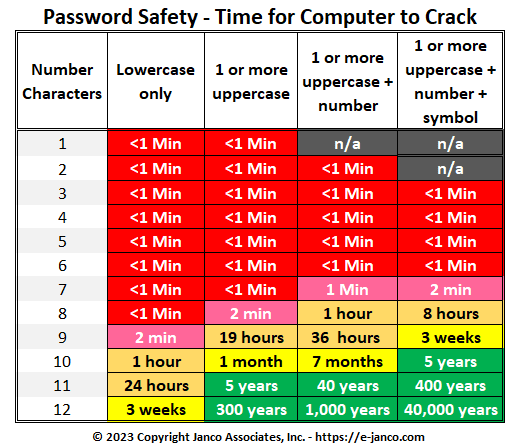
Everything marked in red is a situation where a hacker can get ALL of the passwords for ALL of the users. Those in green are secure to the point that they are not crackable.
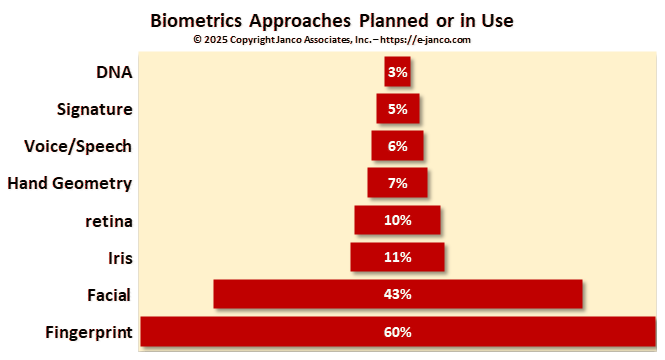
Biometrics will replace passwords
Passwords are absolutely vital to computer and network security. They establish front-line defense by tenaciously guarding the user's account. An inadequate password creates a weak barrier often resulting in account theft.
Do not reuse passwords
Use a password in only one place. Reusing passwords or using the same password all over the place is like carrying one key that unlocks your house, your car, your office, your briefcase, and your safety deposit box. If you reuse passwords for more than one computer, account, website, or other secure system, know that all of those computers, accounts, websites and secure systems will be only as secure as the least secure system on which you have used that password. Don't enter your password on untrusted systems. One lost key could let a thief unlock all the doors. Remember: Change your passwords on a schedule to keep them fresh.
A safe and secure password must follow the following criteria
- It should contain special characters such as @#$%^&
- It must be at least 8 characters long.
- It shouldn't be simply common words such as "password" or your login name, neither be your birth date, 123 or any words that can be found in the dictionary in any language.
- It must contain a variety of capital and lower case letters.
Also, these are the elements that you should definitely avoid when creating your password
- Logical sequences such as names of places.
- Common words such as ‘airplane' should be replaced with symbols, example ‘a!rPlan£s'.
- Family names and dates of birth shouldn't be included in a password.
Finally, it's very important to use a different password for each website you register with, the reason being that should you forget your password, you will no longer have access to your email account, chat or other services which you probably make use of on a daily basis.
The following policies that should be put in place for all passwords
- The password must be at least 8 characters long.
- The password must contain at least:
- one alpha character [a-zA-Z];
- one numeric character [0-9];
- one special character from this set:
` ! @ $ % ^ & * ( ) - _ = + [ ] ; : ' " , < . > / ? - The password must not:
- contain spaces;
- begin with an exclamation [!] or a question mark [?];
- contain your login ID.
- The first 3 characters cannot be the same.
- The sequence of the first 3 characters cannot be in your login ID.
- The first 8 characters cannot be the same as in your previous password.
- Passwords are treated as case sensitive.
- Your login ID.
- Names of co-workers, pets, family, etc.
- Phone numbers, license numbers, or birthdays.
- Simple passwords like "asdf" (adjacent keys on a keyboard).
- Words, which can be found in a dictionary.
- Use a name, modified slightly, like "b0b$mith" or "M@ryL0ng".
- Use a phrase you can remember, like "hello world" modified to "hel10@World".
- "tL*5i?wu" (contains letters, special characters, and numbers).
Even though it is not a rule, it is strongly recommended that you use a combination of both upper and lower case letters.
Security Manual Template
This Security Policies and Procedures Manual for the Internet and Information Technology is over over 230 pages in length. All versions of the Security Manual template include both the Business & IT Impact Questionnaire and the Threat & Vulnerability Assessment Tool (both were redesigned to address Sarbanes Oxley and CobiT compliance). In addition, the Security Manual Template PREMIUM Edition contains 16 detail job descriptions that apply specifically to security and Sarbanes Oxley, ISO 27000 (ISO27001 and ISO27002),CobiT, PCI-DSS, and HIPAA. Data Protection is a priority.
Order Security Manual Template Download Sample
