
IT
Service Management
Service-Oriented Architecture Template
Best Practices World Class Enterprises
ITIL and ISO 20000 Compliant
Change Control - Help Desk - Service Requests
Blog - Personal Web Site - Sensitive Information
Your company can't afford to waste any IT infrastructure investment, but you probably can't afford to hire expensive consultants to develop an IT infrastructure to fully support your SOA efforts either. Fortunately, you can now use proven ITSM best practices while developing your own infrastructure. The IT Service Management for SOA is a best practices methodology from Janco Associates that provides predefined standards, policies, and procedures for an enterprise to support its efforts as it begins the implementation of a Service-Orient Architecture.
This is a set of "Best Practices" developed by and or World Class Enterprises. They are proven policies, procedures, and standards which can be implemented in any size of enterprise.
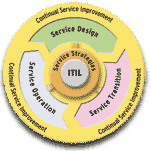
The IT Service Management SOA Policy Template is a 126 page document that contains policies, standards, procedures and metrics that comply with the ITIL Standard. Included in the template are:
- Service Requests Policy
- Service Request Standard
- Help Desk Policy
- Help Desk Standards
- Help Desk Procedures
- Help Desk Service Level Agreement
- Change Control Standard
- Change Control Quality Assurance Standard
- Change Control Management Workbook
- Documentation Standard
- Application Version Control Standard
- Version Control Standard
- Internet, e-Mail and Electronic Communication Policy
- Blog & Personal Web Site Policy
- Travel and Off-Site Meeting
- Sensitive Information Policy
- Sample Service Level Agreement with Metrics
In addition, the ITSM SOA template includes the Business and IT Impact Questionnaire, a Change Control Request Form and an Internet Use Approval Form. The document conforms with ITIL and has been updated to focus on supporting the the development, implementation and operation of a Service-Oriented Architecture.
The template can be purchased by itself or with supporting job descriptions. We do provide an update service for the template as it is modified. You can see a full table of contents and some sample pages by clicking on the link below.
The ITSM Job bundle contains the following job descriptions:
- Director Sarbanes-Oxley Compliance
- Manager Change Control
- Manager Customer Service Center
- Manager Help Desk Support
- Manager Metrics
- Manager Quality Control
- Manager Service Level Reporting
- Manager User Support
- Capacity Planning Supervisor
- Change Control Analyst
- Change Control Supervisor
- Help Desk Analyst
- Metrics Measurement Analyst
- Quality Measurement Analyst
This template comes in Word and PDF Formats. In addition the Silver version includes the job descriptions listed above (PDF and Word format) and the Gold version includes the 243 jobs from our Internet and IT Position descriptions andiGuide.
The template can be purchased by itself or with supporting job descriptions. We do provide an update service for the template as it is modified. You can see a full table of contents and some sample pages by clicking on the link below.
IT Service Management Template come is four versions
Service Oriented Architecture News
Mobile devices are the bane of many CIOs concerns
As
more companies embrace the broad usage of individually-owned mobile devices for
access to corporate applications and data, CIO are asked for guidance on the
establishment of an associated device usage policy.
Every organization needs to identify and develop mobile security policies to be deployed which will provide adequate protection. The level of protection has to be aligned with the level of risk that your organization is willing to accept. These policies should ensure that the many regulatory or compliance concerns that might be applicable are addressed.
Only by a partnership of information technology (IT), human resource (HR), finance, and legal teams - working closely with your executive team and business unit managers - can determine the exact corporate liable and/or individual liable policy that best fits your company, meets its financial goals and objectives, and takes into account security, legal, regulatory, tax, or other requirements and considerations that may uniquely apply to your company and its operations.
- more infoWill IT spending increase in 2012
IT spending is expected to increase in 2012. After years of budgets crimped by the economy, there is significant pent-up demand at companies around the globe to drop some extra cash for the products and services theyve been waiting for to drive business forward. But weve heard this song before. One research fiorm that was bullish on IT spending last year, said that it could rise somewhat significantly in 2012, yet in its latest report the research firm acknowledges that its estimates might have been too optimistic. Global spending on IT spending will still be up, the company says, but dont expect it to rise too quickly.
Janco has found that consultants and contractors are starting to be hired again.
The salary survey is updated twice a year; once in January and then again in July. You can get a free copy of the full survey if you provide 10 valid data points and use a corporate email address. Free email accounts like gmail or yahoo do not qualify as we have no way to verify the accuracy of the data provided.
The report is updated twice a year, once in January and second time in July. The unemployment data on this page is updated at least once a month and is based on the Bureau of Labor Statistics data.
- more info
New Facts of Life For the CIO and IT Management
The world has changed and the CIO and IT managers need to face the new
realities. They include:
- iPhone and Tablet are here to stay
- CIO and IT department no longer are in control of how technology is used by you enterprise
- There will always be some downtime
- Systems will not be 100% compliant all of the time
- The cloud will not be the solution for all problems and will case new ones
- There will never be enough capital and staff to get what needs to be completed done
- The network has already been compromised
- Social networking use risks all of your company's secrets
- Users will always need your support even for technology that you have not implemented
- IT will continue to be viewed as a service
organization
Compliance Best Practices
Security compliance best practices include:
- Combine written content, usage, and retention policies with a Hosted Managed Email Archiving Service to ensure an organization's ability to preserve, locate, and produce legally valid email evidence. Unmanaged email and other record management solutiond can trigger financial, productivity, and legal issues for your organization when it a finds itself in a workplace lawsuit. The cost and time required to produce subpoenaed email, retain legal counsel, secure expert witnesses, mount a legal battle, and cover jury awards and settlements is ver costly. Best practices call for a proactive approach to email and business records management.
- Utilize a proven archiving technology to ensure forensic compliance. For example, by encrypting and archiving a copy of every business record and internal and external email sent or received and across the organization, a Hosted Managed Email Archiving Service solution guarantees that your email is secure and tamperproof. Nothing in your archive can be deleted or altered. Everything in your archive is legally compliant.
- Ensure that financial data and related documents are effectively protected from malware, viruses, and other malicious intruders - and are preserved in a legally compliant manner in order to maximize SOX, GLBA, SEC, FINRA, and PCI DSS compliance. This includes having solutions in place to manage messaging threats and compling with regulatory requirements including Email Anti-Virus, Email Archiving, Email Continuity, and Email Content Control.
- Meet HIPAA requirements by using formal policies, employee training,
and technology including email
Archiving, Anti-Virus, Continuity, and Content Control Services to ensure compliant use of email to transmit and store HIPAA-regulated patient information. - Safeguard personal or sensitive data whose transmission falls under state encryption laws or other privacy acts by deploying proven solutions that are designed to effectively identify personal information in any electronic transmission and, if necessary, block or encrypt the transmission.
- Reduce business and security risks associated with electronic communication by implementing a formal electronic communication policy that combines a written policy with employee training.
Where not to hide your password and user ids

With
dozens of logins and passwords spread out across an equal number of sites and
apps, it's no wonder the average user tends to forget them. Even with a tried
and true system for generating memorable but complex passwords, the formula
could easily fall apart if you just can't remember it.
So rather than continually clicking the "Forget Your Password?" help link, folks are readily hiding login information around their computer station.
And given that there's little variety in those secret locations, "hiding" might be a stretch. The most common locations where folks hide their login info are:
- Under the keyboard
- Under the phone
- Under the mouse pad
- On the monitor
- In the top drawer
- Under the desk