
 Patch Management Version Control Policy Template
Patch Management Version Control Policy Template - Not long ago, patch management was barely a blip on the radar screens of most security and IT personnel. 'Install and forget' was a fairly common practice; once deployed, many systems were infrequently or never updated. Obviously, for a number of reasons, this approach is no longer an option.
 The rise of widespread worms and malicious code targeting known vulnerabilities on unpatched systems, and the resultant downtime and expense they bring, is probably the biggest reason so many organizations are focusing on patch management. Along with these threats, increasing concern around governance and regulatory compliance (e.g. HIPAA, Sarbanes-Oxley) has pushed enterprises to gain better control and oversight of their information assets. Add in increasingly interconnected partners and customers and the rise of broadband connections and remote workers with BYOD and company issued devices, and you have the perfect storm that has thrust patch management to the forefront of many organizations' list of security priorities.
The first important step in a patch management operation is to know when there is a need for a patch to be made. A patch management policy should have a section detailing what must be done to ensure the security personnel know what to do in this situation. Patch scanning can be one option or monitoring the media. Patch scanning is obviously the most convenient method and the least time-consuming as in most cases it can be setup and left to work autonomously. However, even then your monitoring policy should still include monitoring of current events because it is not always the case that a patch is released before a vulnerability is made known to the world. Sometimes the vulnerability is disclosed before a vendor has had time to develop a patch and it is imperative that when this happens your security team acts on it just the same.
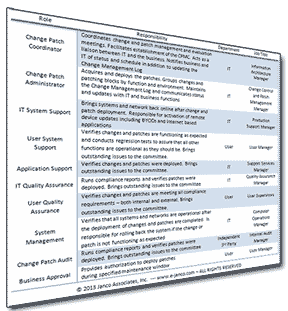
Patch Management - Version Control Policy
Includes 3 full job Descriptions: Manager Change Control; Change Control Supervisor; and, Change Control Analyst and a electronic Change Patch Management Log
Patch management and version control are an on-going process. The reality of software and network vulnerabilities is that, after you apply a patch, a new vulnerability will be addressed sooner rather than later. This is part of the DevOps process and needs to be managed with a robust patch management process which includes:
- Detection - Tools to scan systems for missing security patches. The detection should be automated and trigger the patch management process.
- Assessment - If necessary updates are not installed, determine the severity of the issue(s) addressed by the patch and the mitigating factors that may influence your next steps. By balancing the severity of the issue and mitigating factors, determine if the vulnerabilities are a threat to your current environment.
- Acquisition - If the vulnerability is not addressed by the security measures already in place, download the patch for testing.
- Testing - Install the patch on a test system to verify the ramifications of the update against your production configuration.
- Deployment - Deploy the patch to production computers. Make sure your applications are not adversely affected. Employ your rollback or backup restore plan if needed.
- Maintenance - Subscribe to notifications that alert you to vulnerabilities as they are reported. Begin the patch management process again.
- Obsolesce - Over time multiple version of an application and/pr software will exit and the need to be a process in place for obsolesce of old versions which the enterprise no longer supports.
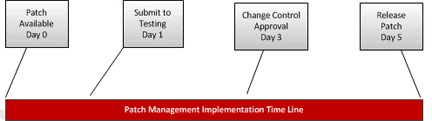
The policy comes with an electronic form - Change and Patch Management Control Log. A form with full instructions that is in Microsoft Excel (.xlsx) format. Included with the instruction set are directions for how to customize the form.
Order Patch Management Policy Download Selected Pages Version History
