Industry Standard Disaster Recovery Plan Template Business Continuity
DRP BCP Template
ISO 22301 & 27000, SOX, PCI-DSS & HIPAA Compliant
Order Disaster Plan Template Download DRP Customer Base
 Industry Standard Disaster Recovery Template - In most organizations, DR is a very unfamiliar task. Disasters happen so infrequently that recovery operations are not routine. What's more the myriad, interconnected data, application and other resources that must be recovered after a disaster make recovery an exceptionally difficult and error-prone effort. Even if you have never built a DR plan before, you can achieve great results. Just follow the DR Template that Janco has created and you will have a functioning plan before you know it.
Successful Business Continuity / Disaster Recovery plans focus on how employees communicate, where they go and how they will keep doing their jobs when the even occurs. The details can vary greatly, depending on the size and scope of a company and the way it does business. For some businesses, issues such as supply chain logistics are most crucial and are the focus on the plan. For others, information technology may play a more pivotal role, and the Business Continuity / Disaster Recovery plan may have more of a focus on systems recovery.
But the critical point is that neither element can be ignored, and physical, IT and human resources plans cannot be developed in isolation from each other. (In this regard, Business Continuity / Disaster Recovery has much in common with security convergence. ) At its heart, Business Continuity / Disaster Recovery is about constant communication.
Janco's Disaster Recovery Plan (DRP) is that tool which can be used as a Disaster Planning template for any size of enterprise. The Template and supporting material have been updated to be Sarbanes-Oxley and HIPAA compliant. The template comes as both a Word document and a static fully indexed PDF document. The DRP/BCP Template includes:
- Disaster Recovery Plan and Business Continuity Template (WORD and PDF)
- Business and IT Impact Analysis Questionnaire
- Work Plan
- Disaster Recovery / Business Continuity Audit Program
- Pandemic Planning Checklist
- Incident Communication Plan and Policy
Preparation for Disaster Recovery / Business Continuity in light of SOX has two primary parts. The first is putting systems in place to completely protect all financial and other data required to meet the reporting regulations and to archive the data to meet future requests for clarification of those reports. The second is to clearly and expressly document all these procedures so that in the event of a SOX audit, the auditors clearly see that the DRP exists and will appropriately protect the data.
The Disaster Recovery / Business Continuity and Security Manual Template bundle comes in three versions - Standard, Premium, and Gold.
 Disaster Recovery Business Continuity & Security Manual Templates Standard
- Disaster Recovery Business Continuity Template
- Security Manual Template
Both of the templates have been recently updated to meet new compliance requirements for ransomware, EU madated issues and BREXIT operational considerations
"Best of Breed - Best Practices Disaster Recovery Planning / Business Continuity Planning and Security Policies" according to the IT Productivity Center
Disaster Recovery Business Continuity & Security Manual Templates Premium
- Disaster Recovery Business Continuity Template - Standard Edition
- Security Manual Template - Standard Edition
- 41 Job Descriptions including:
CIO; CCO; Chief Digital Officer, Chief Experience Officer, Chief Mobility Officer, CSO; VP Strategy and Architecture; Data Protection Officer, Director e-Commerce; Database Administrator; Data Security Administrator; Manager Data Security; Manager Database; Manager Disaster Recovery; Manager Disaster Recovery and Business Continuity; Pandemic Coordinator; Manager Facilities and Equipment; Manager Media Library Support; Manager Network and Computing Services; Manager Network Services; Manager Site Management; Manager Training and Documentation; Manager Voice and Data Communication; Manager Wireless Systems;Capacity Planning Supervisor; Disaster Recovery Coordinator; Disaster Recovery - Special Projects Supervisor; Network Security Analyst; System Administrator - Unix; System Administrator - Windows
Disaster Recovery Business Continuity & Security Manual Templates Gold
- Disaster Recovery Business Continuity Template - Standard Edition
- Security Manual Template - Standard Edition
- 326 Job Descriptions which includes all of the job descriptions in the premium edition
"Best of Breed - Best Practices Disaster Recovery Planning / Business Continuity Planning, Security Policies, IT Job Descriptions" according to the IT Productivity Center
Security Manual Template - Standard Edition
-
 Business and IT Impact Questionnaire
 - Threat and Vulnerability Assessment Toolkit
- Security Management Checklist
- Full Detail Policies for
- Blog and Personal Website Policy
- Internet, Email, Social Networking, Mobile Device, and Electronic Communication Policy
- Mobile Device Policy
- Physical and Virtual File Server Policy
- Sensitive Information Policy
- Travel and Off-Site Meeting Policy
- Job Descriptions for the Chief Compliance Officer, Chief Security Officer, Data Protection Officer, Manager Security and Workstations, Manager WFH Support, Security Architect, and Systems Administrator.
- Work From Home (WFH) operational rules
- HIPAA Audit Program
- GDPR Compliance Checklist to meet EU Requirements
- CCPA - California Consumer Privacy Act requirements definition
- Consumer Bill of Rights
- Sarbanes Oxley Section 404 Checklist
- HIPAA Audit Proram
- Security Audit Program- fully editable -- Comes in MS EXCEL and PDF formats -- Meets GDPR, ISO 28000, 27001, 27002, Sarbanes-Oxley, PCI-DSS, HIPAA FIPS 199, and NIS SP 800-53 requirements -- Over 400 unique tasks divided into 11 areas of audit focus which are the divided into 38 separate task groupings
- Electronic forms that can be Emailed, completed via a computer or tablet, and stored electronically including: Blog Policy Compliance, BYOD Access and Use, Company Asset Employee Control Log, Email - Employee Acknowledgment, Employee Termination Checklist, FIPS 199 Assessment Electronic Form, Internet Access Request, Internet Use Approval, Internet & Electronic Communication - Employee Acknowledgment, Mobile Device Access and Use Agreement, Employee Security Acknowledgment Release, Preliminary Security Audit Checklist, Risk Assessment, Security Access Application, Security Audit Report, Security Violation Reporting, Sensitive Information Policy Compliance Agreement, Server Registration, and Threat and Vulnerability Assessment
- eReader version of the Security Manual Template
- BONUS - ISO 28000 Supply Chain Security Audit Program in MS EXCEL and PDF formats.
Security Manual Template - Premium Edition
-
Security Manual Template Standard Edition - Electronically Delivered
- Security Team Job Descriptions MS Word Format
- Chief AI Officer (CAIO); Chief Compliance Officer (CCO); Chief Security Officer (CSO); VP Strategy and Architecture; Data Protection Officer (DPO); Director e-Commerce; Database Administrator; Data Security Administrator; Manager Data Security; Manager Facilities and Equipment; Manager Network and Computing Services; Manager Network Services; Manager Training and Documentation; Manager Voice and Data Communication; Manager Wireless Systems; Identity Management Protection Analyst, Information Security Analyst, Network Security Analyst; System Administrator - Linux, System Administrator - Unix; and System Administrator - Windows
Security Manual Template - Gold Edition
-
Security Manual Template Premium Edition Electronically Delivered
- IT Job Descriptions MS Word Format - Updated to meet all mandated security requirements
- 326 Job Descriptions from the Internet and IT Job Descriptions HandiGuide in MS Word Format including all of the job descriptions in the Premium Edition. Each job description is at least 2 pages long and some of the more senior positions are up to 8 pages in length.
Order DRP BCP Security Bundle Download Sample
Included in the Disaster Recovery Business Continuity Template are:
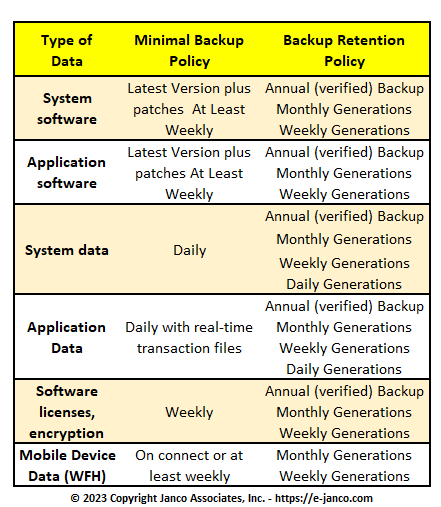
- Backup & Backup Retention Policy
- Disaster Recovery Audit Program
- Compliance with the ISO 27000 Series Standards (formerly ISO 17799 now ISO 27001 & ISO 27002), Sarbanes-Oxley, PCI-DSS, and HIPAA
- Web Site Disaster Recovery Planning Form
- Project Status Report Form
- Personnel Location Report
- Department Disaster Recovery Activation Workbook
- Quick Reference Guide
- Team Alert List (Form)
- DRP Team Responsibilities
- DRP Team Checklist
- Critical Function(s) Definition
- Normal Business Hour Response Procedures
- After Hours Response Procedures
- DRP Location(s) Definition
- DRP Recovery Procedures
- Notification Procedures
- Notification Call List (Form)
- Updated Business and IT Impact Analysis Questionnaire
- Vendor Disaster Recovery Questionnaire
- Vendor Phone List Form Updated
- Key Customer Notification Form
- Critical Resources to be Retrieved Form
- Business Continuity Off-Site Materials Form
- Business Continuity Audit Program
Table of Contents
Order DRP BCP Template DRP BCP Sample
DRP BCP Template General Description
The DRP template is over 200 pages and includes everything needed to customize the Disaster Recovery Plan to fit your specific requirement. The electronic document includes proven written text and examples for the following major sections of a disaster recovery plan:
- Plan Introduction
- Business Impact Analysis - including a sample impact matrix
- DRP Organization Responsibilities pre and post disaster - DRP / BCP checklist
- Backup Strategy for Data Centers, Departmental File Servers, Wireless Network servers, Data at Outsourced Sites, Desktops (In office and "at home"), Laptops and PDA's.
- Recovery Strategy including approach, escalation plan process and decision points.
- Disaster Recovery Procedures in a check list format
- Plan Administration Process
- Technical Appendix including definition of necessary phone numbers and contact points
- Job Descriptions
- Disaster Recovery Manager
- Manager Disaster Recovery and Business Continuity
- Pandemic Coordinator
- Work Plan to modify and implement the template. Included is a list of deliverables for each task. (Risk Assessment and Vulnerability Assessment)
- Disaster Recovery Manager Responsibilities
- Distribution of the Disaster Recovery Plan
- Maintenance of the Business Impact Analysis
- Training of the Disaster Recovery Team
- Testing of the Disaster Recovery Plan
- Evaluation of the Disaster Recovery Plan Tests
- Maintenance of the Disaster Recovery Plan
Click on the link below to get the DRP/BC sample pages now and make it part of your disaster recovery toolkit.
Order DRP BCP Template DRP BCP Sample
Backup Matrix - Sample from Template
Order DRP BCP Template DRP BCP Sample
Testimonials
Testimonial - Dave Baker - City of Hamilton -I have found the DRP template invaluable!
Testimonial - Bob Rifenbury -mCSE/CCNA Launch Testing Lab -The DRP Template saved me about 6 months of work!
Testimonial - Kelly Keeler - Martin's Point Health Care -I have received and I began using the template immediately. IT IS GREAT! Made this process a snap for me. Cut my documentation time down from. weeks to hours! This document has made, what began to be an overwhelming process turn into a snap!
Testimonial - Juan Stamos - Mexico City Corporation -We had a DRP in place, but needed a more user friendly structure. The Disaster Recovery Template (Gold edition) has that structure. It was very easy to quickly move our DRP into Janco's DRP Template -- a real added value.
This template is not for resale or re-distribution - Disaster Plan Template, Disaster Recovery Planning TemplateDisaster Recovery Template, Disaster Recovery
Order DRP BCP Template Sample DRP BCP Template History